Introducing the LilUI Compilation

One of the most frequently commented upon UIs belonged to Lilitharien. After much prodding, persuasion and begging over Twitter, she graciously agreed to do a write up and explanation of her UI as a guest post due to the overwhelming amount of interest.

Last Tuesday Matticus posted 33 screenshots of Healing UIs he’s collected via the PlusHeal forums. Since then he’s gotten lot of messages about the featured UIs, including (but not limited to, I’m sure) questions about my own, and I’ve even gotten messages on the PlusHeal forums about it. And there was some speculation in the comments, too, about whether or not I am using SpartanUI (For the record, I am not!). Thus, I jokingly suggested to Matt that I could write an article about my UI… and he said go for it. So, here I am!

For the link to this entire addon compilation, click here.

I’m Lilitharien, I play on the Thorium Brotherhood server in the guild and I’m a Discipline Priest.

Layout

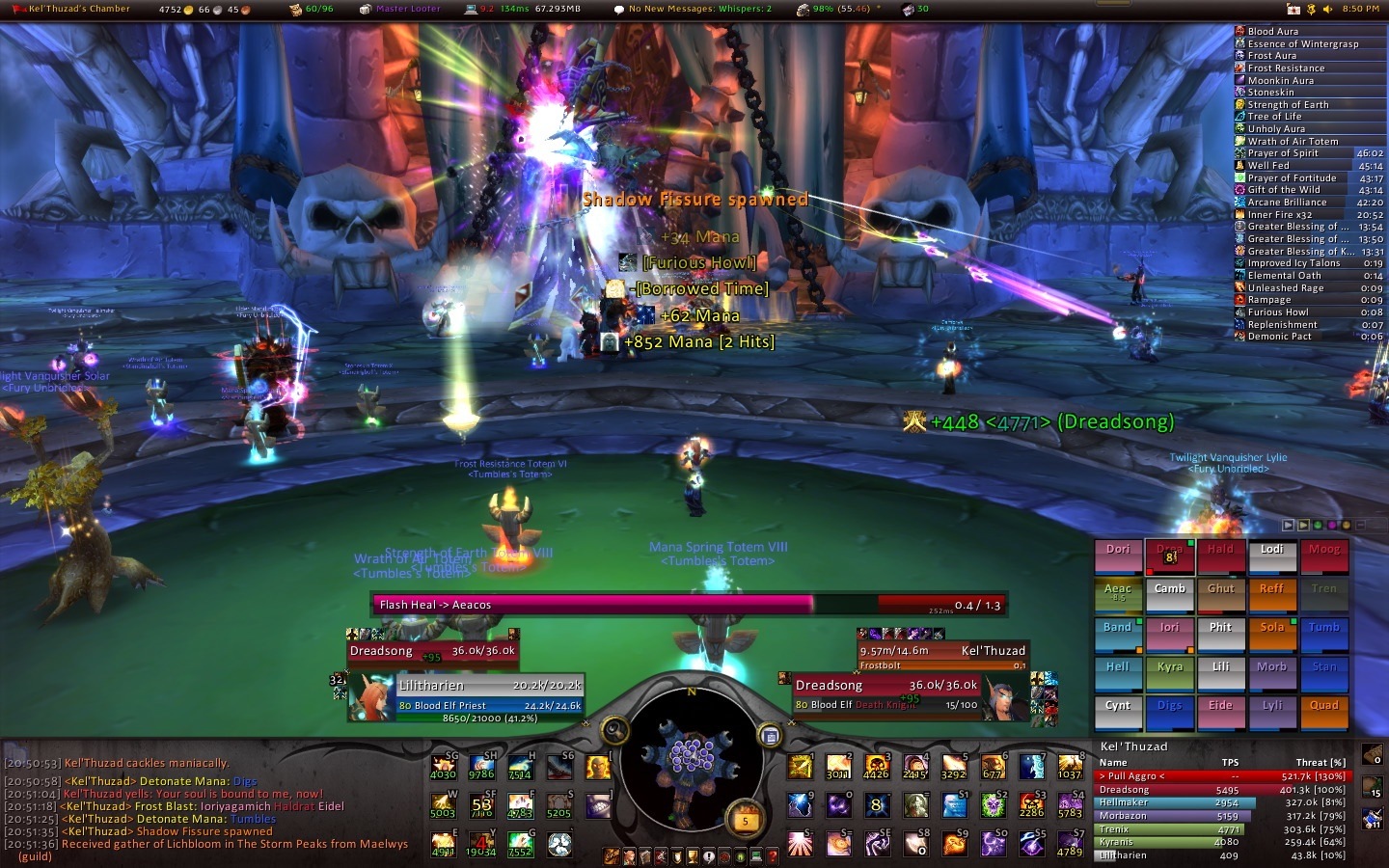
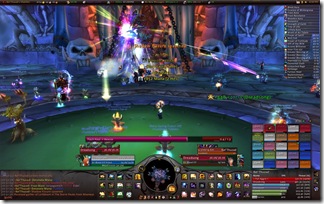
This is my UI, taken during a Kel’Thuzad fight last Thursday (click to enlarge):
raid25_KT

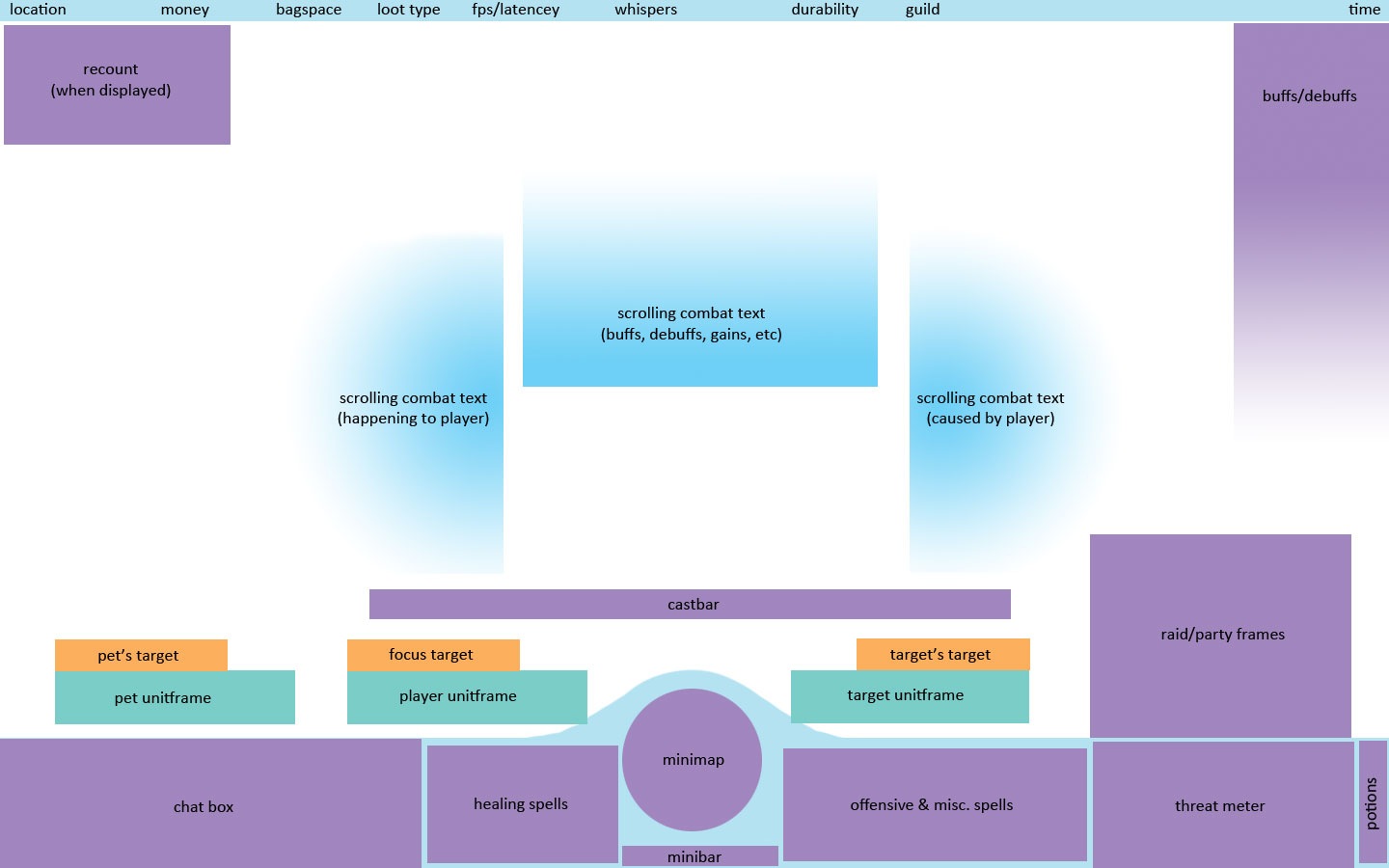
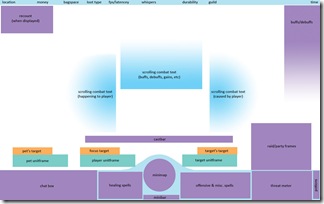
And here’s a breakdown I whipped up in Photoshop (click to enlarge):
ui-explained

Frames

Unitframes For my basic unitframes (myself, target, target’s target, focus target, pet, and pet’s target) I use Pitbull4. It’s configured to show debuffs in the center-most side of the frame and buffs on the outter-most side. I show a maximum of 4 debuffs and 8 buffs on these frames to save clutter, and I have it filtered to prioritize buffs/debuffs that are caused by me or that I can dispel. Health bars for players are colored by class, otherwise they’re colored by hostility: Red for hostile, yellow for neutral, green for friendly.

For my raid or party frames, I use Grid. Grid is a little complicated to set up, but absolutely amazing once you’ve got it tailored to your needs. I have a few addons I use along with Grid, and I indicate those in parenthesis next to their function. You can certainly find more to suit your specific class/spec.

My set-up is as follows:

Entire frame changes size depending on size of party or raid (GridAutoFrameSize), and grows up from the bottom. Health frames are colored by class.

  • First text line shows first 4 letters of player’s name.
  • Second text line (GridIndicatorText3) shows health deficit and also Readycheck status.
  • Third text line shows Feign Death, Death, or AFK status (GridStatusAFK}.
  • Mana, energy, rage or runic power bars (GridManaBars) are aligned to the bottom of the frame.
  • Border around frame is colored white to show my target, red to show Aggro, green to show Disease debuff, or purple to show Magical debuff. Bottom left indicator is red and shows Aggro.
  • Bottom right indicator is golden yellow and shows Prayer of Mending.
  • Top left indicator is white and shows Power Word: Shield.
  • Top right indicator is green and shows Renew.
  • Middle icon shows Weakened Soul debuff and remaining time on it (GridCooldownText).
  • Left side indicator (GridSideIndicators) is colored 3 different shades of blue to show Grace stack (GridStatusGrace).

There’s a dark blue, medium blue, and light blue.

Buffs/Debuffs

For my buff/debuff display, I use ElkBuffBars. Buffs display above debuffs, and everything grows down from the top. Debuffs are colored red to make them easier to see.

Castbar

For my castbar I use Quartz. I’ve customized my bar to be hot pink (only because I like the color but, really, you can choose any color you like!) and to show total cast time, remaining cast time, latency/lag in red, name of spell and who I’m casting it on. It looks something like this:

[Name of Spell –> Target time-remaining/total-cast-time]

I have it set this way because I use Clique to click-cast raid targets, and this allows me to see where my heal is going (if it’s different from my current target) and when exactly I can click or use a hotkey to start casting my next spell. Being able to see the latency/lag in your cast time is very, very important as a healer!

Bars

Actionbars For my action bars I use a combination of Dominos and ButtonFacade. I’ve paired all my healing spells on one side of my screen (the left, between my chat box and minimap) and all my offensive/misc spells on the other side. I have all my buffs in a bar that’s hidden, and my mana potion, healthstone, and out-of-combat food has it’s own vertical bar on the right-most side of my screen. Every single one of my spells (along with my mana potions and healthstones!) are hotkeyed to something on the keyboard. In addition, some spells are assigned to mouse clicks via Clique, which I have configured to only work on my Grid frame. My minibar is situated underneath my minimap. I also have OmniCC installed to show the remaining cooldown time on my spells and DrDamage to show the average amount of healing or damage on each spell so I can make split-second choices at a glance without having to do the math myself. The current ButtonFacade skin I’m using is Apathy, but I’ve used Serenity in the past.

Minimap

My minimap is placed in the bottom-center of my screen and is configured via Chinchilla. I have it set to not show anything but the north indicator, calendar, and search bubble at all times. When I have mail, the mail button appears above my calendar button. When I PVP, the battleground button appears on the left-bottom side of the map. Current coordinates appear on the bottom of the map, above the minibar. To keep my minimap free from the clutter of all those little buttons from addons, I use MBB, or “Minimap Button Bag.” This appears as the little purplish button on the top-right of my minimap. When I click on it, it expands all my minimap buttons above it in a row.

Chatbox

My chatbox is situated on the bottom left of my screen, and the only addon I use for it is Prat 3. This colors all players names by class (you’re probably noticing that I love having things colored by class), adds a time stamp to everything and allows me to shorten my channel names. I also hide the chatbox buttons and enabled mouse scrolling. There’s a ton more you can do with it, but this is all I need. For whispers I use WIM, or “WoW Instant Messenger.” This pops up all my whispers in separate IM-like windows, which helps me keep track of all my conversations. While I’m in combat, however, whispers won’t pop up. They’ll just appear in the chatbox as they normally would.

Rings

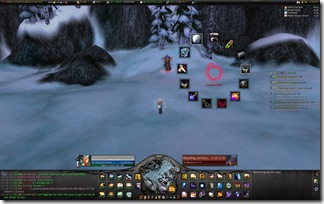
Some people put things like their tradeskills, mounts, and buff food on their action bars. I used to do this, too, but I find this take up sooooo much excess space. Instead I use an addon called OPie. OPie allows me to create “rings” of buttons that I can call up with keybindings (or mouse clicks!). I have my buff food in one ring, my mounts and hearthstone in another, and tradeskills in yet another. OPie also includes a ring for quest items, so I don’t have to go digging in my bags everytime I need to use one while doing dailies. (There’s also a ring for assigning raid targets, but as a healer I don’t use this one so much.) The ButtonFacade skin I use for this addon is DSMFade.

Tooltips

I use TipTac to reskin my tooltips and move the tooltip anchor. I have it set to show names and healthbars colored by class. (More coloring by class! I know! I like consistency.) For extra information, I rely on Informant and EnhTooltip (part of Auctioneer Advanced). They add item numbers, how much the item costs or sells for, how many in a stack, how many vendors sell it, etc. I also use Bagnon_Tooltips (part of Bagnon) which tells me which of my alts have the item, how much they have, and where it’s stored. Combat: Threat Meter A staple for any raider, my threat meter of choice is Omen. I have it placed on the bottom-right of my screen between my offensive/misc spells and my potion/healthstone/food bar. It shows the the name of the target it’s calculating threat for; the top 5 people, their threat number and percentage; and myself, so I can see exactly where I stand.

Scrolling Combat Text

I used to raid without one, but I hated going to back into my combat log to check things. I’d rather have the information on-hand, when it happens. Thus, I use MikScrollingBattleText. I have this split into 3 different parts. The center “box” displays buffs, debuffs, procs, and things like mana returns during combat; They appear in the center and scroll upward before disappearing. The left-side displays things that are happen to me, whether it’d be damage, healing, or otherwise, and who it is being done to me by. The right-side displays what I am doing; It shows heals, overheal, and damage alongside with the name of the target it’s being done to. Both the left and right sides scroll down and outward on a curve before disappearing. I really like this combat text mod, too, over the default one because it uses icons to indicate which spells are doing what. So, for instance, when I get mana returns from Rapture, I see the icon for my Rapture talent.

Boss/Fight Information

For boss timers and information, I use Deadly Boss Mods. For player statistics, I use Recount. I don’t believe further explanation is needed for either. Dispelling I use Decursive to inform me of any magical or disease debuffs that I can dispel. However, I don’t use the addon’s miniframes. Instead, I assigned my abolish disease and dispel magic spells to shift+right click and shift+left click, respecitively, using Clique. Thus, Decursive tells me who needs what removed, and I use my mouse keybinds on Grid to cast.

Loot/Gear

I use a few addons to help me with loot: EquipCompare, RatingBuster, and AtlasLoot. EquipCompare shows my currently equipped item next to whatever I’m hovering over, and RatingBuster does all the math for me; It calculates and displays health, mana, mana regen, spellpower, crit, haste, and hit gains or losses compared to what I have currently equipped. AtlasLoot allows me to check out which loot drops from which boss in-game. I also have InspectEquip, which adds the boss/instance an item comes from to the tool tip as well as displaying a list of where someone’s items have come from when I inspect them.

Making It Pretty

Textures/Art

I use a rather old addon called DiscordArt to position my graphical textures. The textures, as some people have noted, make it look like I’m using SpartanUI. In fact, I am not using SpartanUI at all! I found that UI buggy at best and crashing my game at worst. But, I still really liked the art used for the bottom of the screen. So, I downloaded SpartanUI and extracted the art from it. Then, I placed the art in-game using DiscordArt. It was really rather simple.

Information Panel

I use TitanPanel to display at-a-glance information at the top of my screen. This includes my location/coordinates, money, bag space, current loot type, fps/latency/memory usage, whispers, durability, current signed-in guild members (TitanGuild), mail (TitanMail), volume, and time.

Lining Things Up

I use an addon called Align that creates a grid on my screen so I can line all my UI elements up. Obsessive compulsive? Maybe. I’m a graphic designer instead of a healer outside of Azeroth, so I can assure that everything is purposefully and aesthetically placed.

Typography

I use ClearFont2 to change the overall fonts in my UI, and I also make sure the text selections in my addons use the same font. I have everything set to use Calibri 0.9.

Miscellaneous Addons

  • AkisRecipeList: Adds a frame to my tradeskill window that tells me what patterns I have left to learn and where I can locate them.
  • AdvancedTradeSkillWindow: Expands my tradeskill window and adds a queue and materials shopping list.
  • Bagnon: Simplifies my bag and bank into one frame. Also allows me to view the items in my bank when I’m no where near one. As I mentioned before, it also tells me which of my alts has an item, how many they have, and where it’s stored.
  • Carbonite Quest: Quest tracking, information, and map. I mostly have the map not showing and the quest tracker minimized unless I’m doing quests or dailies.
  • Cartographer: World map mod; Allows me to see areas I haven’t explored, among other things.
  • CloseUp: Allows me to zoom in on things in the Dressing Room, Inspect, and Character/Pet windows.
  • FarmIt: Let’s me see how much of an item I have total in my bags at a glance, so I don’t have to go digging or do any math. I have this hidden or disabled unless I’m farming something, obviously.
  • FriendsFacts: Adds race, sex, level, class, and guild name of my friends to my friends list.
  • FriendShare: Global friends list that syncs between characters.
  • Gatherer: Keeps track of locations of nodes, herbs, and chests.
  • GatherSage2: Adds skill-level and other information to gathering item tooltips.
  • InFlight: Flight timers.
  • MagicRunes: Since Pitbull doesn’t include Runes on their unitframes, this is what I use for my Death Knight. They display right above my minimap.
  • QuestGuru: Expands my Quest Log window. Also includes a tracker, but I don’t use it since I have Carbonite Quest.
  • RecipeKnown: Colors a recipe green if I have learned it already, even on an alt. Prevents me from buying duplicates and wasting money/tokens.
  • Reputation: Automatically switches which reputation I’m watching based on the last reputation gained.
  • SendSelf: Adds my alts to the send-to autocomplete feature at the mailbox without having them on my friends list.

Other Screenshots

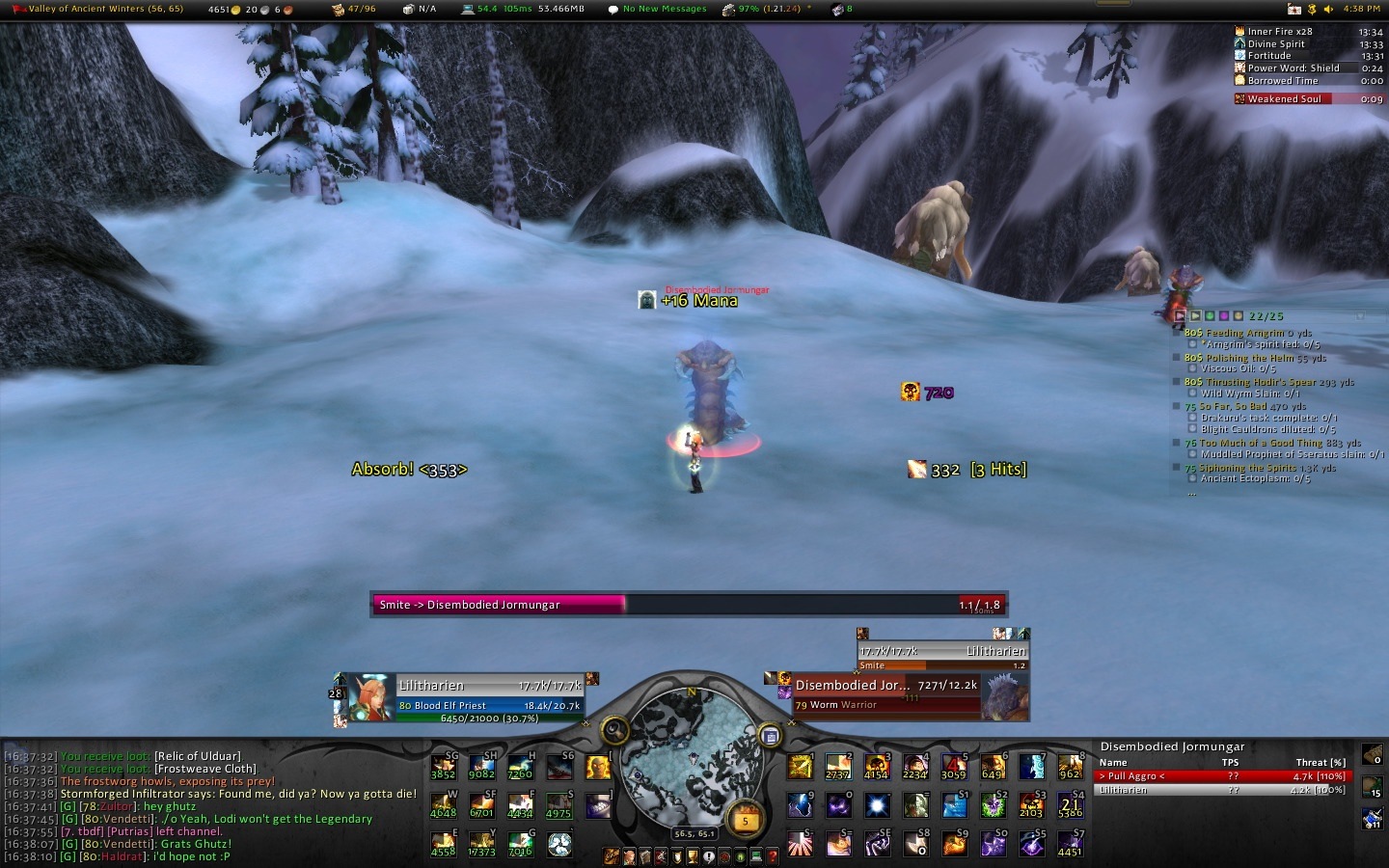
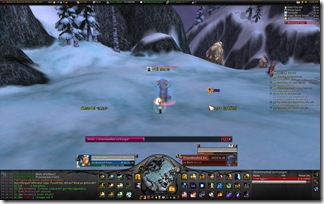
Solo questing (Click to enlarge):
solo_casting

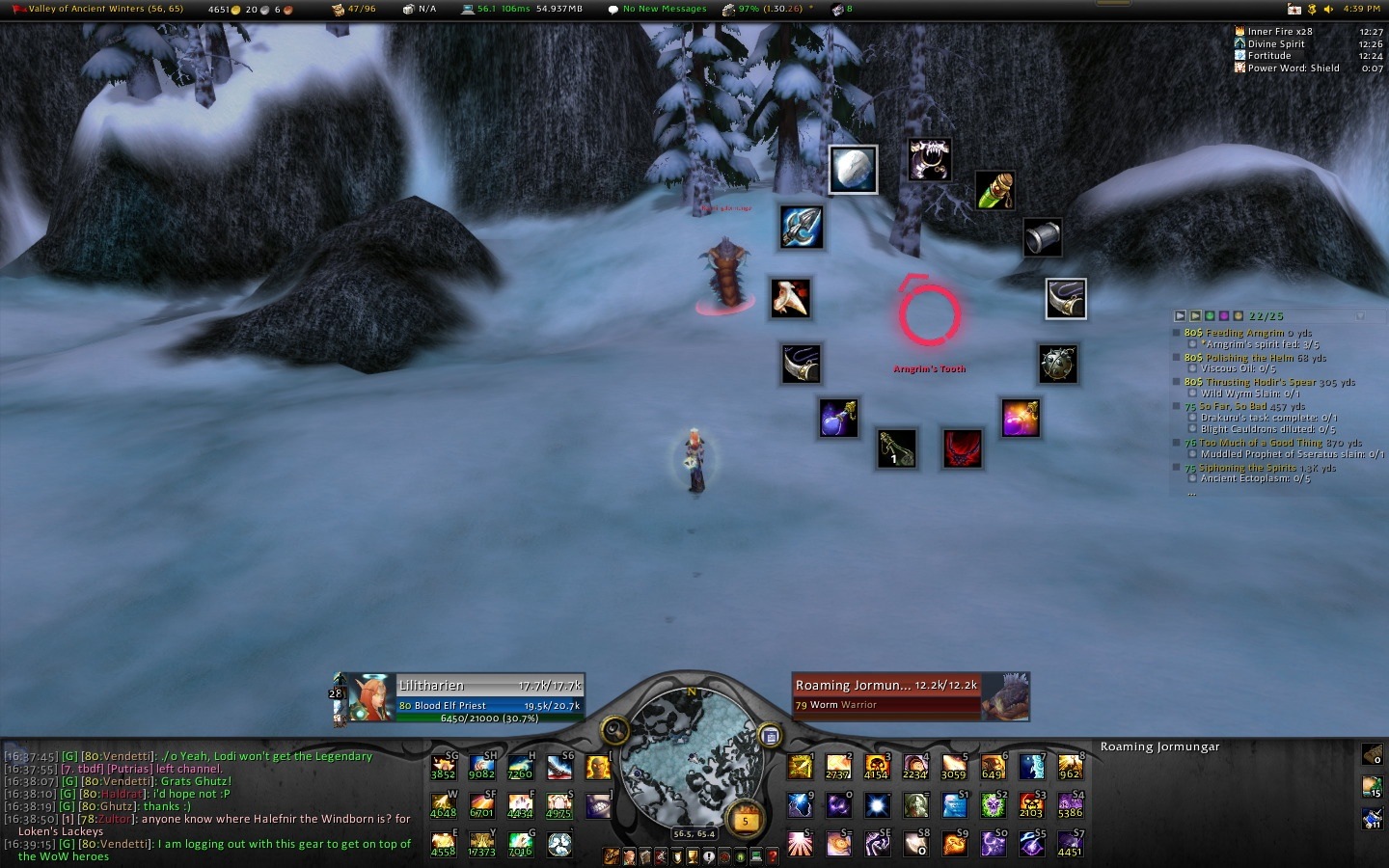
Solo questing with OPie Quest Ring (Click to enlarge):
solo_opie

Download

Now that I’ve explained to you the exhaustive list of addons I use, you may or may not like my set-up. If you do, and it seems enough people do considering the feedback I’ve gotten, I’ve decided to package everything for your convenience. I call it Lil UI

Download LilUI now!

5 Reasons Why the PTR Sucks

ptr-woes

What is the PTR? There’s all sorts of curiosity and questions about this PTR thing. One of my guildies affectionately refer to it as the patience test realm. The PTR as we know it is actually known as the public test realm. It’s several servers that contain upcoming content for players to test such as new class changes, new in game events (like the Argent tournament) and a new raid instance like Ulduar.

But my experience with it has been incredibly frustrating. Of course, there are periods where things aren’t so bad and I can try out stuff. Today’s post is going to feature a list of annoyances and possible suggestions for Blizzard in upcoming content patches.

Instance instability

During the worst of times, the instances are unplayable. I’d have half my raid group inside Ulduar and another half would be waiting outside trying to get in. They’d receive errors like “Transfer Aborted: Instance not found” or “Too many instances. Please try again later.” It was incredibly frustrating. A typical PTR test day would involve 30 minutes of actual boss time and 90 minutes of waiting for people to resolve their technical issues.

I can’t even report any bugs and such or effectively test out stuff since it’s nigh impossible.

Solution: In BC, we’ve got this major traffic artery called the Port Mann bridge. It carries hundreds of thousands of cars daily and it’s still not enough. Right now, the city engineers in are in the process of twinning the Port Mann bridge by doubling the lanes to increase the load that the bridge can carry. I wonder if that same logic is possible to apply by launching more instance servers.

No Mcweaksauce

I know. Blizzard mentioned that players should be prepared to bring their own stash of buffs. I don’t know how realistic it is to have that kind of expectation that players have bags full of flasks, enchanting mats, glyphs and what not for the entire duration of the testing phase. It would just be incredibly convenient.

Solution: Have the entire McWeaksauce family at the staging area just before the instance portal that anyone can go to. Make them slightly larger than normal to prevent mammoths from sitting on top of them.

Overcrowding

Guildies and other players I’ve spoken to explained that previous PTRs were much easier to get in to. Why? Because there wasn’t a whole lot of interest in them. Why? Because people weren’t bored and they still had stuff to do.

Think about it.

A large number of guilds have completed all that the game presently has to offer. More than usual, even. So when word comes out that there’s new stuff to play around with, a lot of players will jump at the chance. I know if I was still working on OS drakes or Malygos, I wouldn’t be as dedicated with the PTR. Most of the traffic seems to occur right around the beginning of a boss being toggled on.

Solution: Not quite sure here. Would more servers do the trick?

Lack of servers

Again, this is similar to the population control. I have players disconnect from world servers. I have players who get network connection errors. I have players who continuously error out. There’s a lot more demand from players who want to get in on the action then there are boxes that can supply that desire. Europe’s got four servers, right? North America has two. But I guess all the European ones come in various languages. It’s at the point now where I routinely pray for other players to get frustrated enough to give up their attempts to get back in so that my group has a higher chance of getting in.

Solution: See above.

Inflated prices

This is just a product of every PTR phase. This is what some players are thinking:

“Gold doesn’t mean a thing so I can charge a crapload for it! I can make a fortune of gold that will be completely and utterly useless! It’s all going to disappear within a few weeks so I can charge obscenely high prices and not give a damn!”

And this ends up being a vicious cycle. One person charges overpriced stuff for enchanting mats or glyphs. This causes everyone else to match the price to come up with the funds to pay for other overpriced stuff. And on and on it continues. Who loses? Just about everybody since they can’t get access to the tools they need to test stuff effectively. And don’t even try to raise the garbage argument that “oh they should’ve gotten their stuff enchanted before coming”. Because we all know there’s new items coming and that stuff should get polished up, too.

Solution: A really savage beating.

So why do I keep going back? Why do I continue to subject myself to hours of teeth grinding annoyances?

Because I still firmly believe that knowledge is power. Sure you can read about strategy and watch live videos of guilds attempting to do it. But the experience and feeling of accomplishment after figuring a boss out on our own? That type of feeling can’t be reduplicated. There’s already strategies and videos out. But for the brief hours I was in there with friends and guildies, the experience of undergoing trial and error to figure out what works and what doesn’t is unmatched. And I have a new whole level of respect for the top tier guilds and raid leaders around the world who engage in this every time new content is available.

Props to those guys. And Stratfu.

Apparently word on the street is that linking to Stratfu brings good luck and many beautiful women. I’ll have to test this theory.

Val’anyr’s Secondary Abilities Unveiled and new PTR Build

MMO Champion has reported that Val’anyr has a new effect added that lends more weight to the fact that it is a hunter healing weapon.

Val’anyr Hammer of Ancient Kings – Equip Effect — Your healing spells have a chance to cause Blessing of Ancient Kings for 15 seconds allowing your heals to shield the target absorbing damage equal to 15% of the amount healed.

This sort of sounds like Divine Aegis on a stick.

I want to stress that there’s still not a whole lot of information about the weapon yet to effectively conclude who can make the best use of it. For now, based on this one effect, it seems to be a favorite for Holy Paladins and Discipline Priests. I think more information is going to be needed like a rough proc rate. Heck, this might not be the only ability. It could be one of a multitude of effects.

I’ve got another post on the way in the future to help discuss Val’anyr and what to keep in mind among all healers when looting the shards.

Anyway, here’s the list of healer changes.

Priests

Discipline

  • Mental Agility changed from 5 to 3 Ranks. Now Reduces the mana cost of your instant cast spells by 4/7/10%. (Old – 2/4/6/8/10%)

Holy

  • Serendipity now reduces the cast time of your next Greater Heal or Prayer of Healing spell by 4/8/12%. (Down from 6/12/20%)
  • Body and Soul *New Talent* – When you cast Power Word: Shield, you increase the target’s movement speed by 30/60% for 4 sec, and you have a 50% chance when you cast Abolish Disease on yourself to also cleanse 1 poison effect in addition to diseases.

Paladin

  • All paladins auras had their range extended from 30 yards to 40 yards.

Holy

  • Sacred Shield now cannot be on more than one target at any one time.
  • Infusion of Light no longer has a chance to reduce the casting time of Holy Light, but increases the the critical chance of your next Holy Light by 10/20% instead.

Druid

Restoration

  • Tree of Life mana cost has been changed from 28% of base mana to 13% of base mana.

Your thoughts?

The First 120 Days of Conquest

This is a quick look back at the first three months in the life of the guild. The first 120 days are usually indicative of how the guild is going to be down the road. There were a few milestone moments. Let’s see how our Loot Council is doing using Kel’Thuzad as a benchmark since he drops some of the most powerful stuff in the game presently. Specifically, we’re going to look at weapons.

We picked up:

  • 2 x Torch of Holy Fire
  • 4 x Last Laugh
  • 3 x Calamity’s Grasp
  • 5 x Journey’s End
  • 4 x Wall of Terror
  • 1 x Betrayer of Humanity
  • 3 x Envoy of Mortality
  • 3 x The Turning Tide

Pretty good on Druid staves and our tanks are well equipped. Hunter’s look like they’re in good shape. So do the casters. Our plate DPS is hurting some with only one Betrayer. Anyway, these are all the high level weapons we picked up from Kel’Thuzad.

Now of those, how many do you think this guild has lost?

Turnover is something to be expected especially in a guild as young as this one. I called it the 30% rule:

30% of loot obtained in raids will be lost.

It doesn’t really matter why it’s lost. It could happen for a multitude of reasons. Items could get disenchanted because no one in the raid wants it or is eligible for it. I’ve lost players to other guilds and real life. In such a competitive server, it’s to be expected. Let’s break down the losses, shall we?

Items lost:

  • 1 x Torch of Holy Fire
  • 2 x Turning Tide
  • 1 x Last Laugh
  • 1 x Wall of Terror

The guild has lost 5 items to players that have decided to leave the game or leave the server. I know what you’re thinking. How on earth could you have let this happen? How could you have looted items to players that were going to quit the game or the guild?

Simply put, it’s not always easy. We don’t know that players are going to leave. Even the players don’t know they’re going to leave. These decisions were made with the thought that players would stick around and commit. But I had a player declare himself inactive as he had just moved out of his house and got piled on with extra work shifts a couple of weeks after he picked up a Torch. I had another player lose interest in the game and wanted to focus more on life after we gave him a Turning Tide during the week of New Year’s. Another caster left the guild because he felt that the guild’s goals and his goals didn’t coincide taking another Turning Tide with him (he wanted more than I was prepared to offer). We lost a Last Laugh and a Wall of Terror on a tank who got hacked one day whom we never heard from again.

Is it disappointing? Yeah, I’m not going to lie. It does hurt seeing players walk out. But it’s something to be expected. If I had to do it all over again with the same information, I’m certain the council would have ruled the same way.

It could be worse. All the players who earned those could have been lost.

Attendance and demotions

In hindsight, I should’ve worked a little harder in getting an attendance tracker up and running. It took me around a month and a half before I was finally satisfied with what I had. Up to that point, most of the attendance was tracked mentally and on an excel spreadsheet. I had a pretty good idea of who was present on progression nights, who wasn’t present, and who failed to relay the fact that they were gone.

A lot of players message the GM weeks or days in advance telling them they won’t be around. But as a GM, I have so much on my mind that I often forget. This can lead to misunderstandings. I often preach to my players that if they’re going to be late or if they’re going to miss a raid, leave it on the forums. This way, there’s clear evidence that they made an attempt to sign out (we don’t use a sign in system).

A raider is a rank of privilege. If you’re a raider, you’re expected to show up to every raid. It’s assumed that you will be there on the nights and times that we raid. Obviously there are going to be things that happen in life that causes you to miss a night or two. That’s understandable. But this is the expectation. My E-Office is always open. I’m probably one of the most accessible guildmasters out there as there’s a multitude of ways to reach me. I’ve had long distance calls on my cellphone and text messages from raiders who tell me traffic’s come up or work’s keeping them busy at the last minute. If a player doesn’t login for 20 days without notice, I’m not going to fish them out and try to coax them back in. I leave it to them to come to me and explain what’s up. I’m perfectly capable of understanding and trying to work with people. But if I’m left in the dark, I don’t have a problem demoting and looking for replacements like Resto Shamans.

I’ve got another player who picked up a job recently. The job schedule varies from a week to week basis. Sometimes they might not make a raid night, sometimes they can hit all three nights no problem. But as a GM, I cannot plan raids around that sort of unpredictability. It’s situations like that which cause a loss of rank. It’s not fair to me and it’s not fair to the guild. And that’s something I need to put a little more thought into going forward. But I do appreciate the fact that I was informed about the change because I can think ahead and figure out what our guild needs are.

It’s not an easy feeling. I’m friends with many players. And it’s not fun for me to demote them or tell them that they’re sitting out. Ideally, I’d have a guild with 24 other players that were capable of committing every night. But it’s virtually impossible.

I had a reader message me the other night. He was in a tough spot. He had a small 10 man guild going that all consist of friends and family. What should he do if one person can’t make it but really wants to come along? Does he try to accommodate to the chagrin of the other 9? Or does he roll without him and tell him “try again next week”?

And these kinds of decisions suck. If you decide to go, you piss off one person. If you decide to hold and end up not raiding because everyone’s schedule doesn’t work out, you piss off everybody.

I told him that it’s a tough situation to be in. I told him you can either be a good GM or a good friend. Often times, it’s difficult to be both.

I deliberately wrote this into my charter. Above all else, Conquest is a progression minded raiding guild, not a friends and family guild. When players protest about being benched, I remind them that it’s what they signed up for and it was a question on the application if they were okay with being benched from time to time.

By the way, kudos to the players that were able to find the Conquest website. I don’t exactly openly advertise the website on the blog. I can tell the really determined players because they’re able to navigate through the blog and find the places where I did link. Heck, it’s not even on the realm forums guild directory.

Flame Leviathan Thoughts

flame-leviathan

Yeah there’s going to be a buttload of spoilers here. You probably don’t want to read any further than this.

Tuesday afternoon, Blizzard announced the new PTR boss testing schedules for the week. Flame Leviathan (Normal) would be open from 4 PM onwards. But it looks like someone was trigger happy and they decided to pop it open an hour earlier. I happened to be on right as it opened up and sounded the alarm on Twitter, my guild, and in the WoW Insider war room. Alex Ziebert, shadow Priest extraordinaire, was able to join me. Once we filled up, we got the ball rolling.

So what kind of vehicle does a big, badass Dwarf drive around when he’s feeling bloodthirsty?

siege

That’s right. It’s the only vehicle fit for a dwarf. It’s big. It’s got rams. And it’s got guns. I let someone else drive while I manned the guns on top. After talking to Bronzebeard, we started the event and the Alliance 1st Armored division rolled out of the garage. The division consisted of two tanks, two demolishers and two choppers (bikes). The two siege engines lead the way absorbing the brunt of the Iron army. Demo’s formed up on the rear and attacked at range while choppers were cleaning up anything else that got behind the siege engines.

1st Armored decided to start off with gunnery training. Most of us had no idea what to do so it made sense to start firing on anything that moved and any structures that were destructible. We literally rolled over the opposition with little difficulty.

WoWScrnShot_030309_152037
WoWScrnShot_030309_152240

Click on pictures to enlarge

I found the gun controls were quite stiff to move. It’s like the engineers forgot to add WD-40 to the damn turrets or something. If you’ve ever done Wintergrasp, the controls for aiming are quite easy. You hold down your right mouse button to aim the direction of the camera and the targeting reticle changes direction accordingly. But it’s different in Ulduar. I found that it wasn’t as fluid nor as smooth.

After clearing out the towers, one of the recon choppers noted what looked like a repair pad on the side. We gathered up and repaired our vehicles to full health. Up ahead there was a gate flanked by two Ulduar Colossi.

WoWScrnShot_030309_152927 
WoWScrnShot_030309_152001

Up: Repair pad
Down: Ulduar Colossus

The Colossus is pretty damn large. But the larger they are, the harder they fall. They more really slow, too. I told my driver to switch with me because I had a hunch the vehicle would have a larger vehicle pool. Blizzard did say vehicles would scale with gear. Sure enough, my tank jumped from ~750k health to ~810k.

Matticus was in the hot seat now.

WoWScrnShot_030309_153816
WoWScrnShot_030309_161105

Left: Matt tries to take on the Flame Leviathan to no avail
Right: Matt flooring it after realizing the above the strategy is not working

“Matt! Run! Hit the gas!”
”WTF do you think I’m doing?! Twiddling my thumbs?!”

We didn’t last much longer after that. But I found it a lot of fun. And it is absolutely nothing like Malygos phase 3. Players who have an aversion to vehicle encounters should definitely give this a try at least. And if they hate it, they’ll hate it. But at least try it with a clean slate. Worse comes to worse, if you don’t like driving or shooting, you can be one of the brave souls willing to be thrown on to the top of the Flame Leviathan.

WoWScrnShot_030309_164623

Pretty neat bug where a demo has grappled another demo. There’s still some quirks to be resolved. Towards the end, Alex grappled me onto his demo. I was unfortunately stuck and had no idea how to eject myself. I don’t think I was loaded into the launching arm.

Our best attempt was around 35% before our live raids forced us to cancel out.

Ignis is going to be available for testing today. Try to be on about an hour earlier to avoid the queues that is going to be prevalent. I’ll be in there at around 3 to see if I can scramble some players.

For Flame Leviathan strategy, try checking out Stratfu.